Hear, See or Stream? Picking the Right Baby Monitor for Your Home
Audio, video, Wi-Fi or a bit of everything? Five honest questions to help you choose a baby monitor that suits your home, your nerves and your budget.
Here's a myth worth busting before you spend a penny: the most expensive baby monitor is not the "safest" one.
A monitor is a messenger. It tells you your baby is stirring, crying or wide awake and plotting. That's it. What keeps your baby safe is the sleep setup itself, and that part costs nothing extra. 💛
So the real question isn't "which monitor is best?" It's "which monitor suits my home, my routine and my nerves?" Answer these five questions and the choice gets a whole lot easier.
1. How far will you be from the nursery?
Start with your floor plan, not the feature list.
In a flat or a small terraced house, you might hear a cry through the wall anyway. A monitor there is mostly for peace of mind while the hoover's running or the shower's on. In a three-storey house, or if you like to sit in the garden on summer evenings, range suddenly matters a lot.
- Thick walls or several floors? Check the stated range, then knock a chunk off for real life. Brick and stairs eat signal.
- Patchy Wi-Fi upstairs? A monitor that relies on your router will drop out exactly where your router does.
- Visiting grandparents a lot? Something small and portable that works without setup is a gift.
2. Do you need to see, or is hearing enough?
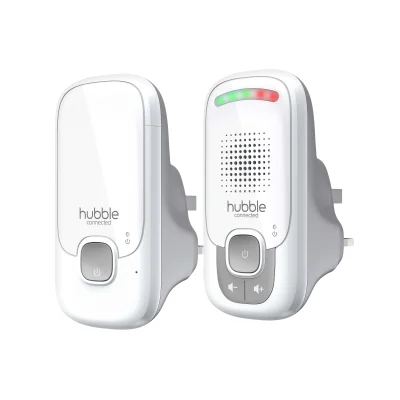
Plenty of parents get along brilliantly with sound alone. Audio monitors are simple, cheap, and the batteries tend to last for ages. You hear a whimper, you decide whether to go in. Done.
They're also lovely for second babies, when you've learnt the difference between "I'm just grumbling" and "I need you now".

Video earns its keep in a different way. It lets you see whether that noise was a proper wake-up or a sleepy wriggle, without opening the door and undoing an hour of settling. If you have a light sleeper (or you're a light sleeper yourself), that can save a lot of unnecessary tiptoeing.
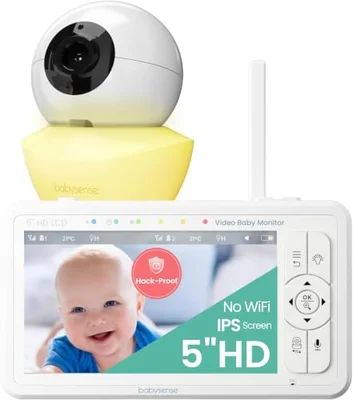
A good middle ground is a video monitor with its own handheld screen and no Wi-Fi at all. It works straight out of the box, with no app, no account and nothing to update.

3. Will you want to check in from your phone?
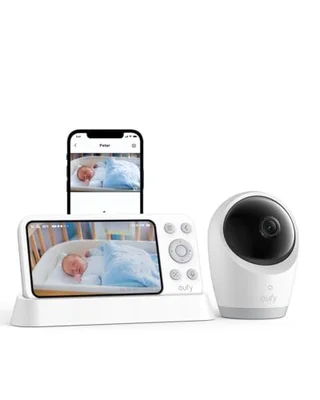
This is where Wi-Fi monitors shine. Your partner can peek in from work, a grandparent can check the nap is going OK during a babysit, and you can watch from the sofa without a separate screen on the coffee table.
The trade-offs are worth knowing, though:
- They depend on your home internet. If the broadband wobbles, so does the picture.
- Some features sit behind a monthly subscription. Check before you buy, not after.
- Anything online needs basic security housekeeping: a strong, unique password, two-step login if it's offered, and updates switched on.
Can't decide? Hybrid monitors give you both. They come with a parent screen that works without Wi-Fi, plus an app for when you're out of range or want to share access.
And if you'd rather not buy a thing yet, an old phone can do the job. Apps like Nuvio turn a spare handset into a camera, which is a handy way to test whether you even want video before committing. 📱
4. Where will the camera actually go?
This is the bit people forget until the box is open. And it's the bit that matters most for safety.
The usual advice from the Lullaby Trust and other safety organisations is simple: keep the monitor and its cables well out of your baby's reach. That means at least a metre away from the cot or Moses basket, with no wires dangling down the side or tucked along the mattress.
- Never fix a camera or run a cable on or inside the cot.
- Remember babies grow, stand and reach. A spot that's safe at six weeks may not be safe at nine months.
- Use cable tidies or trunking to keep wires flat against the wall.
- Avoid perching it on a wobbly shelf above the cot, where it could fall.
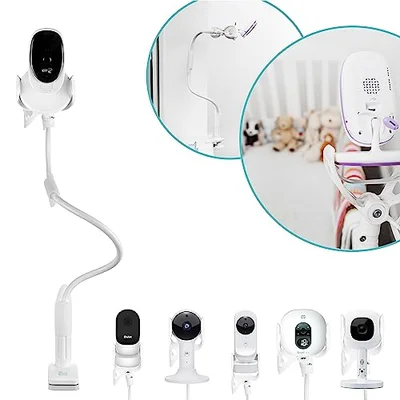
A clamp or flexible mount makes all this far easier. You get a good top-down view from a safe distance, without drilling into a rented wall.
5. What do you actually want it to do for you?
Monitors now come with a dizzying list of extras. Room temperature readings. Lullabies. Two-way talk. Night lights. Sleep tracking. Some are genuinely useful (a temperature display is a nice nudge on chilly nights), while others will be used twice and forgotten.
It's also worth being clear on what a monitor can't do. No monitor, however clever, prevents SIDS, and breathing or movement sensors aren't a substitute for safe sleep basics. Those basics are: baby on their back, in their own clear, flat sleep space, in the same room as you for the first six months.
If you're feeling anxious about your baby's breathing or sleep, that's completely understandable. It's also a conversation worth having with your health visitor or GP, rather than something to solve with a gadget.
A quick cheat sheet
- Small home, relaxed parent, tight budget: audio is plenty.
- Light sleeper, bigger house, no fuss: video with its own screen, no Wi-Fi.
- Two working parents or lots of family help: Wi-Fi or hybrid.
- Not sure yet: try a spare-phone app first, then decide.
And whichever you pick, give yourself permission to turn the volume down sometimes. Babies are noisy sleepers. Grunts, squeaks and snuffles are all part of the soundtrack, and you'll learn which ones need you very quickly. 😴
Ready to add a monitor to your list? Pop your favourite on your BubsNest registry so friends and family know exactly what you'd love.
Ready to Create Your Baby Registry?
Start your free baby registry today and share it with friends and family.
Get Started Free