VTech RM5755HD vs Owlet Dream Sight: Two £99 Baby Monitors, Only One Keeps Working When the Wi-Fi Drops
Same price, same core features, but only the VTech comes with a parent unit that works with no Wi-Fi at all. The Owlet Dream Sight hits back with a sharper 2K picture. Here is how to choose.
COMPARISON · BABY MONITORS
Spend £99 on a baby monitor in 2026 and you are really choosing between two philosophies. The VTech RM5755HD is a traditional monitor that has learned some smart tricks: it comes with its own 5-inch parent screen that talks directly to the camera, and adds a phone app on top. The Owlet Dream Sight goes the other way entirely. There is no parent unit in the box, just a sharp 2K camera and an app, so your phone becomes the monitor.
On paper they cost the same, both have night vision, two-way talk and a room temperature sensor, and neither needs a subscription for live video. So the decision is not about price or picture tick-boxes. It comes down to one question most parents only think about at 2am: what happens when the Wi-Fi drops, the router restarts or your phone goes flat?
We compared both monitors on their published specs, their manuals, retailer listings and the feedback we hear from parents using them night after night. Here is how they really differ, and which household each one suits.
Lil' Bubba's verdicts
- Best Overall: VTech RM5755HD · 8.0/10 - a dedicated parent screen that works with no Wi-Fi at all, plus an app for when you are out
- Best for Picture Quality: Owlet Dream Sight · 7.5/10 - the crisper 2K picture, wider 130° view and humidity alerts, if you are happy to monitor from your phone
Quick comparison
| VTech RM5755HD | Owlet Dream Sight | |
|---|---|---|
| Price (our listings) | About £100 | About £99 |
| Parent unit | 5-inch colour screen included | None, phone app only |
| Works without Wi-Fi | Yes, direct camera-to-screen link | No, needs home Wi-Fi |
| Camera | 1080p, 110° wide angle, 10x digital zoom | 2K, 130° wide angle, 4x digital zoom |
| Room sensors | Temperature | Temperature and humidity |
| Soothing | Night light, 5 melodies, 5 soothing sounds | Two-way talk; white noise needs paid plan |
| Parent unit battery | Up to 12 hrs video, 22 hrs audio (claimed) | Depends on your phone |
| Subscription | None | Optional Owlet360 for video history |
| Our rating |
How we picked these two
Both monitors sit at the same £99 to £100 price point, both are stocked by several of our partner retailers, and both come from brands with a long track record in the nursery. Crucially, they represent the two designs most new parents end up torn between: a hybrid monitor with its own screen, and an app-only smart camera.
We did not include stands or accessories, and we kept to single-camera kits so the comparison stays like for like. Ratings reflect value at the current price, everyday reliability, how easy each is to live with at night, and what parents tell us after months of use rather than the first week.
What to look for in a baby monitor
A link that does not depend on your router. Monitors with a parent unit usually use a direct radio link between camera and screen. If your broadband drops, the monitor keeps working. App-only cameras route everything through Wi-Fi, so a router reboot means a gap in monitoring until it reconnects.
Who is watching, and on what. A parent unit is easy to hand to grandparents or a babysitter. An app needs a login on each phone, and it competes with everything else your phone does, from battery drain to focus modes silencing alerts.
Picture versus practicality. 2K video is genuinely sharper, especially when zooming in on a sleeping baby. But a 5-inch screen on the bedside table shows plenty of detail for the job most parents need: is the baby settled or not?
Room sensors. Temperature is standard now. Humidity is a bonus if your nursery gets stuffy or dry with the heating on.
Subscriptions. Check exactly what is free. Both of these give you live video and alerts without paying, but some features, such as video history, sit behind paid plans.
A monitor is a reassurance tool, not a safety device. Whatever you choose, keep following safe sleep advice: baby on their back, in a clear, flat cot, and keep camera cables well out of reach. For a wider look at the category, see our best baby monitors round-up and our guide to audio, video and Wi-Fi monitors.
1. VTech RM5755HD

The RM5755HD is VTech's answer to parents who want the convenience of an app without giving up a proper monitor. Out of the box, the camera and the 5-inch parent unit pair directly, no router involved. Wi-Fi only comes into play if you want to add the free MyVTech Baby Plus app so you can check in from work, the shops or another room on your phone.
The camera streams 1080p video with a 110° wide-angle view and 10x digital zoom, and the parent screen is a 720p colour display. It is a fixed camera, so you angle it by hand when you set it up rather than panning remotely. Around that sits a sensible set of extras: night vision, a multi-colour night light on the camera, five melodies and five soothing sounds, two-way talk, a temperature alert and a lost-link alarm if the parent unit drifts out of range.
What parents love
- Keeps working when the Wi-Fi does not. The direct link means broadband outages and router restarts do not interrupt monitoring. We hear repeatedly from parents that this is the feature they did not know they needed until the first time the internet went down at bedtime.
- A screen anyone can use. Grandparents and babysitters simply pick up the parent unit. One parent told us: 'My mum would never have downloaded an app, but she was happy carrying the screen around the house.'
- Phone access as a bonus. The app lets a second parent check in from elsewhere, with no subscription needed.
- Built-in soothing. The night light, lullabies and white-noise style sounds can all be started from the parent unit without going into the nursery.
What to know before you buy
- Not the sharpest picture. The 720p parent screen is perfectly clear for checking on a sleeping baby, but it is not as crisp as a 2K camera viewed on a modern phone.
- No remote pan or tilt. Once your baby moves to a bigger cot or starts rolling to the edges, you may need to reposition the camera by hand.
- Battery claims are optimistic. VTech quotes up to 12 hours of video, but with the screen on all night most parents keep it on charge at the bedside.
Best for
- Homes with patchy broadband or Wi-Fi that drops at night
- Families sharing monitoring with grandparents or babysitters
- Parents who want a screen on the bedside table rather than their phone
- Anyone who wants app access without a subscription


2. Owlet Dream Sight
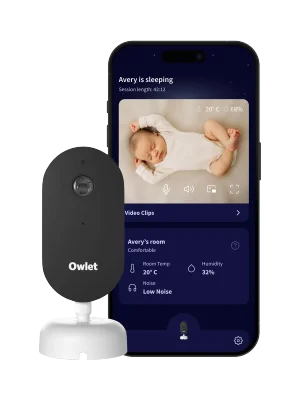
The Dream Sight is the camera half of Owlet's Dream Duo, also sold on its own. It is a smart camera rather than a traditional monitor: 2K HD video with night vision, a wide 130° lens, cry, motion and sound detection, two-way talk, and room temperature and humidity tracking, all viewed through the Owlet Dream app on your phone. It supports both 2.4GHz and 5GHz Wi-Fi and uses Bluetooth for a quick setup.
A wall-mounting kit with cable guards comes in the box, which is a nice touch given how important it is to keep cables out of reach. Live video and alerts are free. The optional Owlet360 plan adds video history, morning sleep reports, saved clips and white noise. If you already own, or plan to buy, the Dream Sock, everything lives in one app.
What parents love
- The sharper picture. 2K video on a phone screen shows far more detail than most monitors at this price, and the 130° lens takes in the whole cot without fiddling.
- Humidity as well as temperature. Handy alerts when the nursery gets too warm, too cold or too dry, which is useful once the heating goes on.
- Watch from anywhere. Both parents can check in from work or the sofa on their own phones with no extra hardware.
- One app with the Dream Sock. Parents who pair the two tell us the combined view is the real reason they chose Owlet.
What to know before you buy
- No Wi-Fi, no monitor. Everything runs through your home network. One parent shared: 'When our router dropped out it disconnected and didn't try very hard to reconnect, so I ended up checking the app every few minutes.'
- Your phone becomes the monitor. Background audio can stop if the app is closed by the phone, focus or sleep modes can silence alerts, and overnight streaming drains the battery.
- Some extras cost more. White noise and video history sit behind the Owlet360 subscription, while the VTech includes its soothing sounds for free.
Best for
- Parents who want the clearest picture for the money
- Families with strong, reliable home Wi-Fi
- Anyone already using, or planning to add, the Owlet Dream Sock
- Couples who both want to check in from their own phones


What about a sock or breathing monitor?
Neither of these monitors tracks your baby's breathing or heart rate. If that is what you are weighing up, it is a different, pricier category, and we compared the two best-known options in Owlet Dream Sock vs Nanit Pro. Worth knowing: the Dream Sight is designed to pair with the Dream Sock, so starting with the camera and adding the sock later is a common route.
How to choose
Choose the VTech RM5755HD if you want a monitor that simply works, every night, whatever your broadband is doing. The bedside parent screen is easy for anyone to use, the soothing features are free, and the app is there when you are out of the house. For most first-time parents it is the safer all-round buy at £100.
Choose the Owlet Dream Sight if your Wi-Fi is rock solid, you are comfortable using your phone as the monitor, and picture quality matters most. It is also the obvious pick if the Dream Sock is on your list, as the two work together in one app.
If you are still undecided, think about the last time your internet dropped in the evening. If the answer is "last week", go with the VTech.
Add it to your Nest
A baby monitor is one of the most-gifted big-ticket items on a registry, and one family members love to chip in on. Add your favourite to your free BubsNest registry and we will show your guests the best live price across our partner retailers.
Ready to Create Your Baby Registry?
Start your free baby registry today and share it with friends and family.
Get Started Free